# Message Status Icons Guide

Chatalog uses various status icons to help you track the delivery status of your messages. Here's what each icon means:

### Message Status Icons

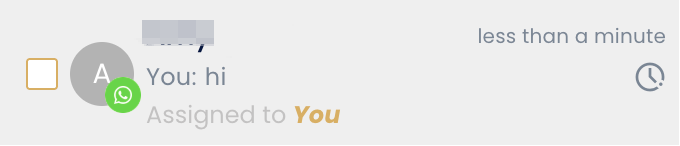
* **Clock**: Sending - Your message is in the process of being sent

<figure><img src="/files/iy7PfOgaS4pyKjmrWm4v" alt="" width="340"><figcaption></figcaption></figure>

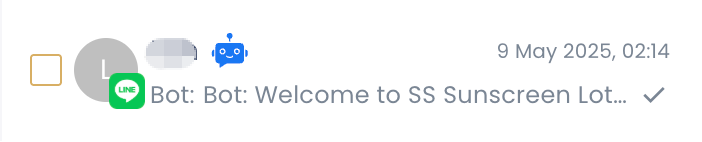
* **Single grey tick**: Sent - Your message has been sent successfully

<figure><img src="/files/MFBJ3xy4xB0BeZzPVHBG" alt="" width="351"><figcaption></figcaption></figure>

* **Double grey tick**: Delivered - Your message has been delivered to the recipient's device

<figure><img src="/files/16gnjQkCo2FViWXnwSwx" alt="" width="350"><figcaption></figcaption></figure>

* **Double blue tick**: Read - The recipient has read your message

<figure><img src="/files/u82HzKezMQGQYaGcTAWQ" alt="" width="350"><figcaption></figcaption></figure>

* **Alert**: Fail - Your message failed to send

<figure><img src="/files/TaOzaO8axGgNOg5P2sg0" alt="" width="361"><figcaption></figcaption></figure>

* **Golden note**: Private note - This is a note visible only for internal
<figure><img src="/files/vBxaZDbBGol9qRyL1NvZ" alt="" width="347"><figcaption></figcaption></figure>


---

# Agent Instructions: Querying This Documentation

If you need additional information that is not directly available in this page, you can query the documentation dynamically by asking a question.

Perform an HTTP GET request on the current page URL with the `ask` query parameter:

```
GET https://docs.chatalog.ai/crm-quickstarts/messages/message-status-icons-guide.md?ask=<question>
```

The question should be specific, self-contained, and written in natural language.
The response will contain a direct answer to the question and relevant excerpts and sources from the documentation.

Use this mechanism when the answer is not explicitly present in the current page, you need clarification or additional context, or you want to retrieve related documentation sections.